
How to Choose the Best Bike Rental Software: A Practical Guide for Rental Operators
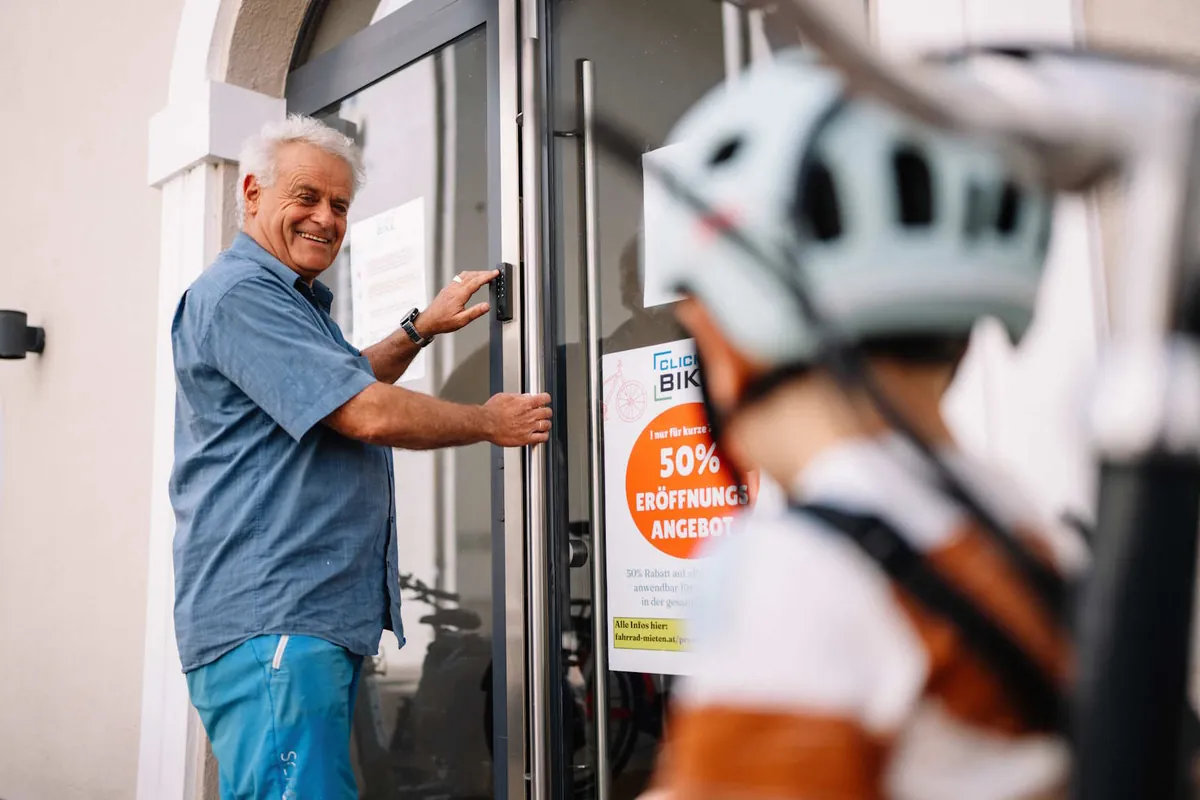
Thomas Dickhoff has run unmanned self-service rental stations in Carinthia, Austria, since 2021. The software behind them became Click&Share.
A bike rental platform should cover the whole rental, not just the booking. This guide walks through the rental from first click to returned bike, lists what to check at each step, and ends with a 20-question checklist you can bring to any vendor demo.
The short version
Most operators compare booking calendars and prices. The real cost of a bad fit shows up later: in deposits handled by hand, phone calls about pickup times, keys that are not where they should be, and damage nobody documented.
This guide is for bike and e-bike rental businesses, outdoor rental shops, and hotels or campsites that want to add rentals. Five things to decide before you look at any feature list:
- How you want to operate: staffed, hybrid or fully self-service, and whether that may change.
- Which steps after the booking you want automated: payment, deposits, instructions, access, changes to the booking, extensions, returns.
- Whether customers should need an app, or just a browser and a phone number.
- How bikes are secured and handed over: keys, keypads or smart locks.
- How you will run more than one location without doubling the work.
1. Start with your operating model, not the feature list
The same platform has to fit a staffed shop in a city centre and an unmanned station at a lake. Decide first how each of your locations should run, then check whether the platform supports that mode without workarounds.
| Operating model | What it looks like | What the platform must handle |
|---|---|---|
| Staffed | Staff hand over bikes, explain the route, check the return | Walk-in and online bookings in one calendar, payment in store or online, quick check-in |
| Hybrid | Staff during opening hours, self-service pickups and returns outside them | Time windows per location, access codes only for self-service slots, clear rules for late returns |
| Unmanned | No staff on site; customers get access codes and help themselves | Automated instructions and codes, smart-lock or keypad integration, online changes and extensions, remote issue reporting |
Three questions that expose a poor fit early:
- Early pickups and late returns. A customer books 09:00 to 17:00 and wants the bike at 08:00. Can the platform allow an earlier start, extend access codes accordingly, and charge the difference?
- A second location. Adding a station at a hotel or a lakeside should take an afternoon, not a new contract and a new account.
- Changing the model later. Many operators start staffed and switch single locations to self-service once they trust the process. The platform should allow self-service per location, not as an all-or-nothing setting.
A platform that assumes one way of working will cost you flexibility exactly when you need it: at season peaks, when staff are off, or when a new location opens.
2. Booking and payment
Booking is the part every platform demos well. Look at the edges instead: what happens with deposits, booking changes, walk-ins, add-ons and the money itself.
Booking types. Check that both reservations in advance and "start now" rentals work from the same store page. Spontaneous rentals in a good-weather window are a large share of revenue at leisure locations, and a booking flow built only for advance reservations loses them.
Availability logic. Ask how the platform assigns bikes. Can a customer pick a frame size or a specific bike, and does the system block that bike for the whole period including buffer time for checks and charging? For e-bikes, charging time between rentals matters as much as the rental itself.
Add-ons. Helmets, child seats, panniers, insurance and delivery should be bookable in the same checkout, with their own stock where that applies.
Payment methods. Card, PayPal, Apple Pay and Google Pay cover most customers in Europe and the US. Ask whether payment in store is possible for walk-ins, and whether unpaid online bookings are allowed at all.
Deposits. This is where manual work hides. Ask whether a deposit can be held on the card as a pre-authorisation and released automatically after the return, rather than charged and refunded. For self-service, a card deposit is often the only practical option.
Payouts and fees. Clarify who holds the money. With a payment provider such as Stripe Connect, rental revenue goes to your own account and the platform fee is deducted transparently. Ask for the full fee list: platform fee, payment fees, SMS costs, and anything charged per location, per bike or per booking. Section 9 covers pricing models in more detail.
Vouchers and discounts. Hotels and partners will ask for codes. Check that discount codes exist, that their use is tied to the booking, and that you can export which code was used with each booking.
3. Customer communication and handover
Most support calls in a rental business are about the same three things: where to pick up, how to get in, and what to do when something is unclear. Good automated communication removes most of them before they happen.
Two messages, not one. A booking confirmation sent immediately is standard. The useful part is a second message shortly before the rental: pickup address, opening hours or access instructions, what to bring, and for self-service the codes. Sending codes only at a cut-off (for example the evening before, or a few hours before start) keeps them out of early confirmations and reduces misuse. Bookings made after the cut-off should receive everything at once.
SMS for the moment of pickup. Customers standing in front of a door do not search their inbox. A short SMS with the door code, one code per bike and the rental period is what they need. Ask how many SMS are included per booking and what extra messages cost.
Fully editable texts. Every message should be editable per location and per language: your tone, your instructions, your rules. Check how many languages are included and whether the language follows the customer's booking.
No app required. An app adds a download, an account and a support topic. A browser-based store and a link to manage the booking work for every customer, including tourists with limited data plans. Treat a mandatory app as a cost, not a feature.
Staffed handover still benefits. Even with staff on site, automated reminders cut no-shows, and a pre-rental message with the shop location and parking reduces late arrivals.
4. Access and smart locks
Access decides whether self-service works at all. There are three levels, and a location can combine them.
| Access level | Hardware | Fits | Watch out for |
|---|---|---|---|
| Door or room code | Keypad lock on a shop, container or bike room | Shops after hours, hotel bike rooms | One code for everyone unless the lock supports time-limited codes |
| Code per bike | Code locks or smart locks on each bike | Open stations, lakeside and trailhead locations | Codes must change per rental, which only works with a platform integration |
| App-based unlocking | Bluetooth locks opened through an app | Fleets already tied to one lock vendor | Forces an app on the customer; check offline behaviour |
Questions to ask the vendor:
- Which lock brands are integrated natively, and which through an integration layer? Ask for the list, not a number.
- Can the platform generate a fresh code per rental and per bike, valid only for the rental period plus a buffer?
- What happens if the lock is offline or its battery dies? Who gets alerted, and can staff issue a manual code?
- Do you buy the hardware from the lock manufacturer directly, or through the platform with a markup?
- Is there a monthly fee per lock on top of the platform price?
Smart locks are not required to start. Many operators run self-service with a keypad on a bike room and cable locks with fixed codes, then move to per-bike smart locks once bookings justify the hardware. The platform should support both, so the hardware decision stays yours.
5. During the rental: changes without a helpdesk
The second-biggest source of manual work after deposits is the booking that changes. The weather turns, the family wants one more hour, the wrong size was booked. Each of these is a phone call unless the customer can fix it online.
A "manage booking" link in the confirmation should let customers do the following without staff:
- Extend the rental, with availability checked in real time and the extra amount charged to the card on file.
- Change the start date or time, if the bike is free.
- Add products such as a helmet or a child seat after booking.
- Switch to another bike of a different size, where the platform supports it.
- Cancel according to your cancellation rules.
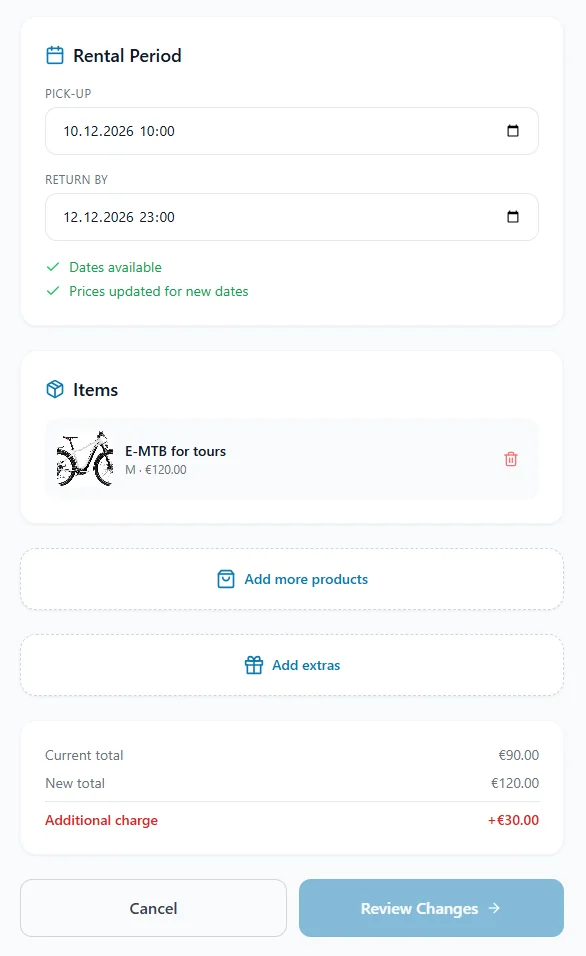
Two details matter in practice:
- Access codes have to follow the change. An extension that charges the card but leaves the lock code expiring at the old time creates exactly the call you wanted to avoid.
- Refunds should follow your policy, not happen automatically. Ask whether a shortened or cancelled booking refunds on its own or creates a case for you to decide.
For staffed shops the same link reduces counter time: customers extend from the café instead of coming back to ask.
6. Return, inspection and maintenance
A rental is not finished when the customer walks away. It is finished when the bike is back, its condition is known, and it is ready for the next booking. This is where most booking tools stop and where the platform should keep going.
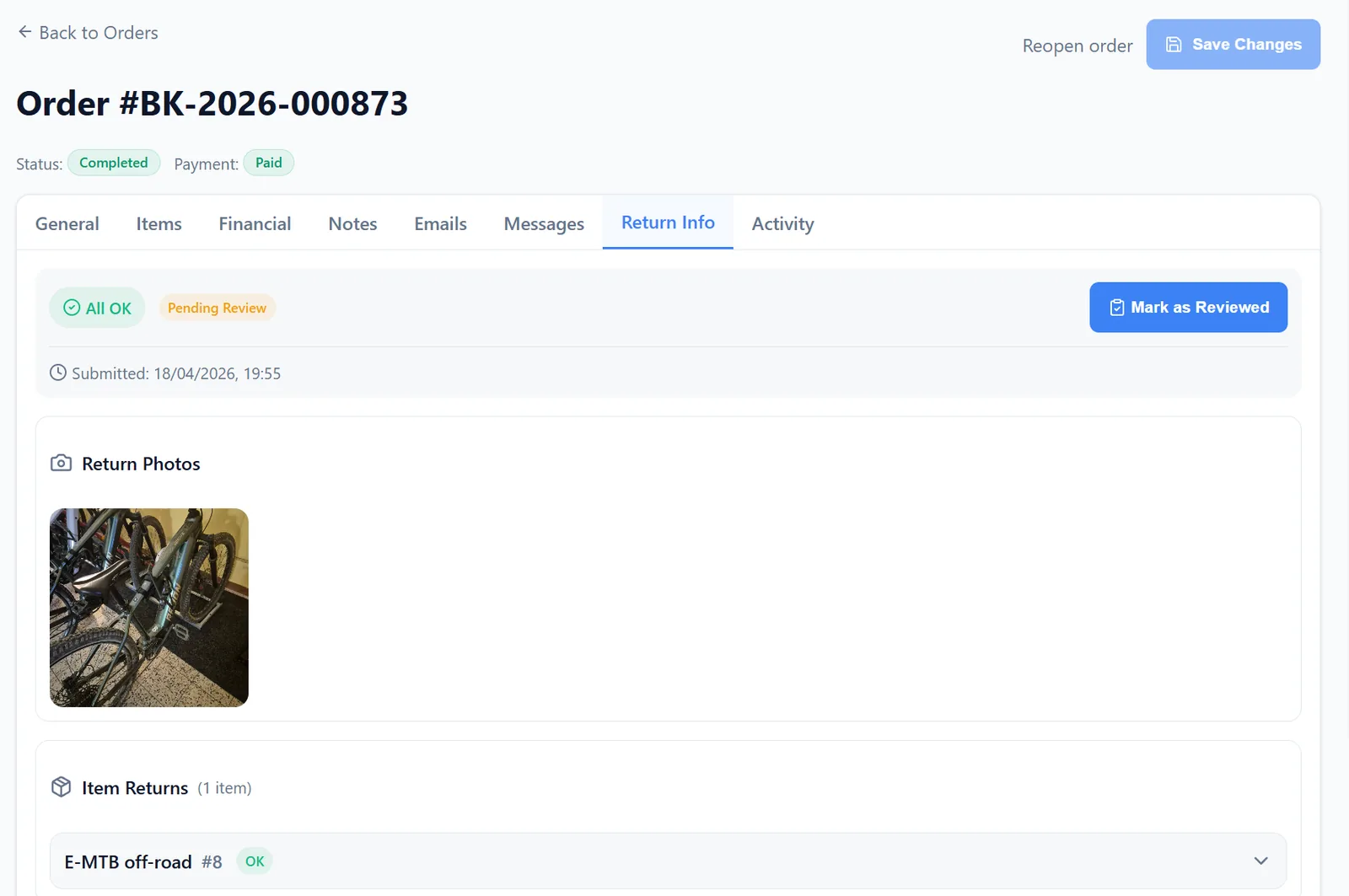
Documented condition. For self-service, the customer should be able to report the state of the bike at pickup and return, ideally with a photo. For staffed returns, staff should be able to log the same from a phone. Without a record, deposit disputes are decided by whoever argues longer.
Issue reporting. A flat tyre, a missing helmet, a broken light. Reports should create a task tied to the bike and the booking, visible to whoever maintains the fleet, and should be able to block the bike from new bookings until it is cleared.
Scheduled checks. E-bikes and rental fleets need regular inspection. Ask whether the platform can create a due maintenance task per bike after a number of rentals or days, and whether that task blocks the bike or just reminds you.
Late and missing returns. A reminder SMS shortly before the end of the rental is cheap and reduces late returns. Beyond that, clarify how the platform handles a bike that is not back: automatic late fees, deposit capture, and what staff see.
Reviews. A request for a Google review after a good rental is the lowest-cost marketing a rental business has. Check that the review request goes out automatically, after the return, with your link.
Operators who run these steps on paper or in chat groups usually underestimate the time involved until a second location makes it visible.
7. Multiple locations and growth
Growth in bike rental rarely means a bigger shop. It means more small stations: a hotel bike room, a campsite, a second lake, a partner shop in the next town. The platform should make the tenth location as easy as the second.
Per-location settings. Opening hours, access mode, pricing, bikes, messages and payout account should be settable per location, under one account and one admin view. One calendar across locations with a filter beats one login per location.
Partner locations. Hotels and campsites usually want one of two things: their own bikes on your platform, or your bikes on their site with a share of revenue. Ask whether the platform supports both, including separate payouts or statements per partner.
Delivery. Delivering bikes to a holiday rental or hotel is a service customers pay for. Check that customers can choose a delivery window at checkout and that delivery pricing can follow your logic, for example by travel time, by distance, by distance bands or by delivery zones.
Pricing per location. Seasonal prices, weekend surcharges and partner rates differ by location. A single global price list is a sign the platform was built for one shop.
Billing. Ask how the platform charges for additional locations and whether a location that only operates for six or seven months a year pays a full year. Section 9 covers this in detail.
8. Integration, data and ownership
A rental platform sits between your website, your payment provider, your locks and your accountant. Check how it connects to each, and who owns what is in it.
Website. The store should work as a link from your existing site and as an embed on it. You should not have to rebuild your website to take bookings. Ask whether the store page is indexable by search engines under your brand.
Branding. Emails and SMS to your customers should carry your name. Ask whether sending from your own email domain is possible and whether it costs extra.
Exports. Bookings, customers, revenue and discount-code usage should export as CSV at any time, without asking the vendor. Your accountant will need it; so will you if you ever switch platforms.
Automation hooks. Tools like Make or Zapier let you connect bookings to a newsletter, a spreadsheet or a Slack channel. Ask whether the platform offers webhooks or an API, even if you do not need them today.
Customer data and GDPR. Clarify who the data controller is, where data is hosted, and which sub-processors handle it (payment, SMS, email, hosting). You should receive a data processing agreement without having to ask twice.
Rental agreements. If you need a signed rental agreement or liability waiver per booking (common in the US, less so in Europe), ask whether digital signing is built in, available on request, or not planned.
Lock-in. Ask what leaving looks like. If your bookings, customers and reviews only exist inside the platform, the switching cost is part of the price.
9. Pricing models: what to compare
Rental platforms price in three ways, and most combine two of them. Compare total cost for your season, not the headline monthly fee.
| Model | How it works | Good for | Watch out for |
|---|---|---|---|
| Fixed subscription | Monthly or yearly fee per location or per bike | Predictable cost, large fleets | Per-bike pricing punishes growth; full-year fees for a six-month season |
| Commission | A percentage of each booking | Small or seasonal operators, no revenue means no fee | High percentages on large fleets; check whether walk-ins paid in store are charged too |
| Hybrid | Low base fee plus a smaller commission | Most operators with 1 to 10 locations | Add-on fees for SMS, locks, extra languages or branding |
Ask for every line item in writing:
- Base fee, and whether it is per account, per location or per bike
- Commission rate, and on which bookings it applies (online only, or in-store payments too)
- Payment processing fees, and whether they are passed through at cost or marked up
- SMS included per booking, and the price per additional SMS
- Fees per smart lock or per integration
- Setup, onboarding and training fees
- Extra cost for additional languages, custom email domain or removing the vendor's branding
- Contract term, notice period, and whether seasonal locations can pause
A worked example helps: take your last season's bookings and revenue per location and run them through each vendor's price list. The cheapest monthly fee is rarely the cheapest season. A free trial of two weeks or a pilot at one location before a wider rollout is reasonable to ask for. For reference, Click&Share's pricing is a hybrid model: a small fee per location plus a share that depends on how much the platform does for you.
10. Checklist: 20 questions for every vendor demo
Bring this list to the demo and ask the vendor to show, not tell, each answer.
Operating model
- Can I run one location staffed and another self-service, under one account?
- What happens when a customer wants to pick up earlier or return later than booked?
- How long does it take to add a new location?
Booking and payment
- Can customers both reserve in advance and start a rental on the spot?
- Which payment methods are supported, and is in-store payment possible?
- Is the deposit a card pre-authorisation that releases automatically after return?
- Where does the rental revenue go, and how is your fee deducted?
Communication and access
- Show me the exact emails and SMS a self-service customer receives, and when.
- Can I edit every message per location and language?
- Does the customer need an app?
- Which smart-lock brands are integrated? Show me a code generated for one rental.
- What happens if a lock is offline at pickup?
During and after the rental
- Can customers extend, change, add products or cancel online without staff?
- Do access codes update automatically when a booking is extended?
- How is the bike's condition documented at return?
- Can a reported issue block a bike from new bookings?
- Can the system create maintenance checks automatically?
Data and cost
- Can I export all bookings, customers and revenue as CSV at any time?
- What is the complete list of fees, including SMS, locks, languages and branding?
- What does it take to leave: notice period, data export, and what I lose?
A vendor who can demo questions 8, 11, 14 and 15 live has done the hard part. Those four are where "supports self-service" usually turns out to mean "sends a confirmation email".
Frequently asked questions
What is a bike rental platform?
Software that lets customers book, pay for and manage bike rentals online and lets the operator run availability, payments, communication, access and maintenance from one system. It differs from a plain booking tool by covering what happens after the booking.
Do I need smart locks for self-service bike rental?
No. Many self-service stations start with a keypad on the bike room and fixed-code cable locks. Per-bike smart locks add security and flexibility once bookings justify the hardware.
Should customers have to install an app?
Preferably not. A browser-based store and a manage-booking link work for every customer, including tourists, and remove a support topic.
How much does bike rental software cost?
Typically a monthly fee per location or per bike, a commission per booking, or a combination. Compare the total cost for a full season including SMS, payment fees, locks and extras, not the headline monthly price.
Can a hotel or campsite offer bike rental without staff?
Yes. With automated instructions, access codes and online changes, a hotel bike room or a campsite station can run with no one at the counter. Checking and cleaning the bikes stays with the host or a local partner.
What is the difference between a booking system and a self-service rental platform?
A booking system records reservations. A self-service rental platform also handles deposits, sends access codes at the right time, lets customers extend or change online, and documents returns and issues.
About Click&Share
Click&Share GmbH, based in Faak am See, Carinthia, Austria, develops a rental platform for bikes, e-bikes and outdoor equipment that covers booking, payment, customer communication, smart-lock access, online changes and return handling in one system. Rental operators in eight countries, including Austria, Germany, the UK, Finland and the US, run their stations on it.
The platform grew out of the company's own business: Click&Bike has operated fully automated, unmanned rental stations in Carinthia since 2021, and the same software runs those stations every day of the season. Customers book in the browser without an app, pay by card, PayPal, Apple Pay or Google Pay, receive their door and bike codes by email and SMS before the rental, and extend or change bookings online. Revenue is paid out to the operator's own account via Stripe Connect. Smart locks from brands such as Nuki and Igloohome are integrated directly.
A live demo of the booking flow is available at demo.store.rentals. More at clickandshare.co.